Memory Mirror
Live demo: https://calluxpore.github.io/Memory-Mirror/
GitHub: https://github.com/calluxpore/Memory-Mirror
The Idea
Prosopagnosia, or face blindness, affects an estimated 1 in 50 people, alongside the millions more living with age-related memory decline, early-stage dementia, or cognitive fatigue who struggle to place the faces around them. The social cost is quiet but constant: missed greetings, mistaken identities, the slow withdrawal that follows when introductions feel unsafe.
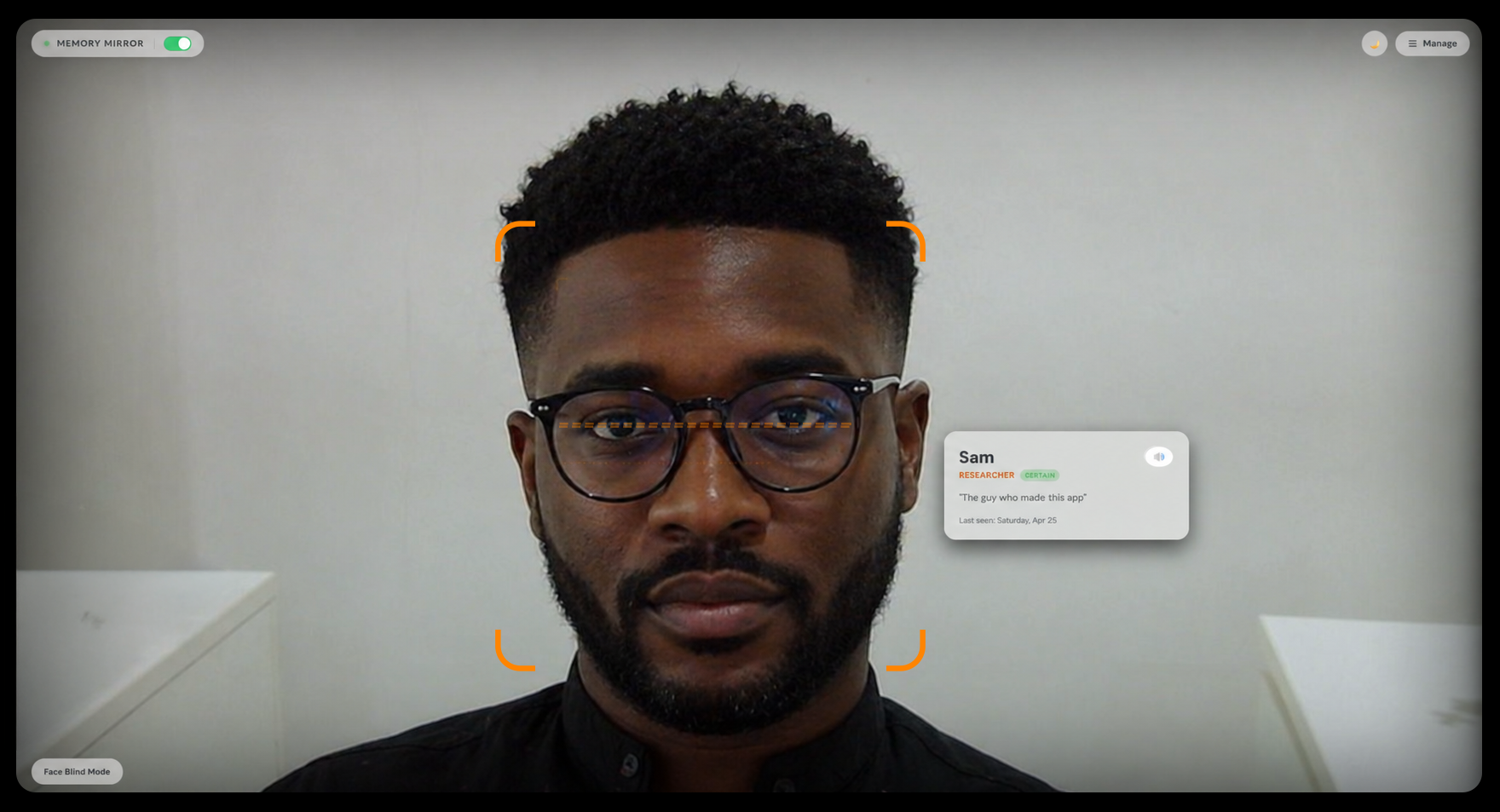
Memory Mirror explores how on-device computer vision can act as a calm, ambient prosthetic for facial recognition. The application runs in a browser on any laptop or tablet. The user keeps the device nearby with the webcam pointed toward the room or the person sitting across from them. When a known face enters the frame, a soft memory card appears on screen beside that face, showing their name, relationship, a personal note, and when they were last seen. The user glances at the screen to get their bearings, then returns to the conversation. No tapping, no searching, no account. Think of it less like an app and more like a reference screen that already knows who walked in.
Everything runs locally in the browser. No frame, embedding, or note ever leaves the device.
Development
Memory Mirror was developed as a self-contained web prototype with deliberately minimal infrastructure, prioritizing privacy, portability, and the lowest possible barrier to use. Anyone with a webcam and a browser can run it without installing anything or creating an account. The core development involved:
- Platform: Vanilla HTML, CSS, and JavaScript with no framework and no build step, deployed as static files on GitHub Pages.
- Input: Continuous live video feed from the device webcam, processed frame by frame in the browser. The camera is pointed at the room or at the person in front of the user, not at the user themselves.
- Recognition pipeline: Built on face-api.js, using pre-trained neural network weights for face detection, landmark extraction, and 128-dimension face descriptor generation. Recognition is performed by computing Euclidean distance against the local descriptor database.
- Enrollment flow: Three pathways for adding people. Live capture, where the camera collects 5 sample descriptors automatically for robustness. Single photo upload. And a batch mode that ingests multiple photos, clusters faces by similarity, and walks the user through naming each detected cluster in a guided queue.
- Storage: All face descriptors, photos, names, relationships, and memory notes persist locally via the browser's localStorage. A single-file export and import system lets users move their full database between devices, with a choice of merge or replace on import.
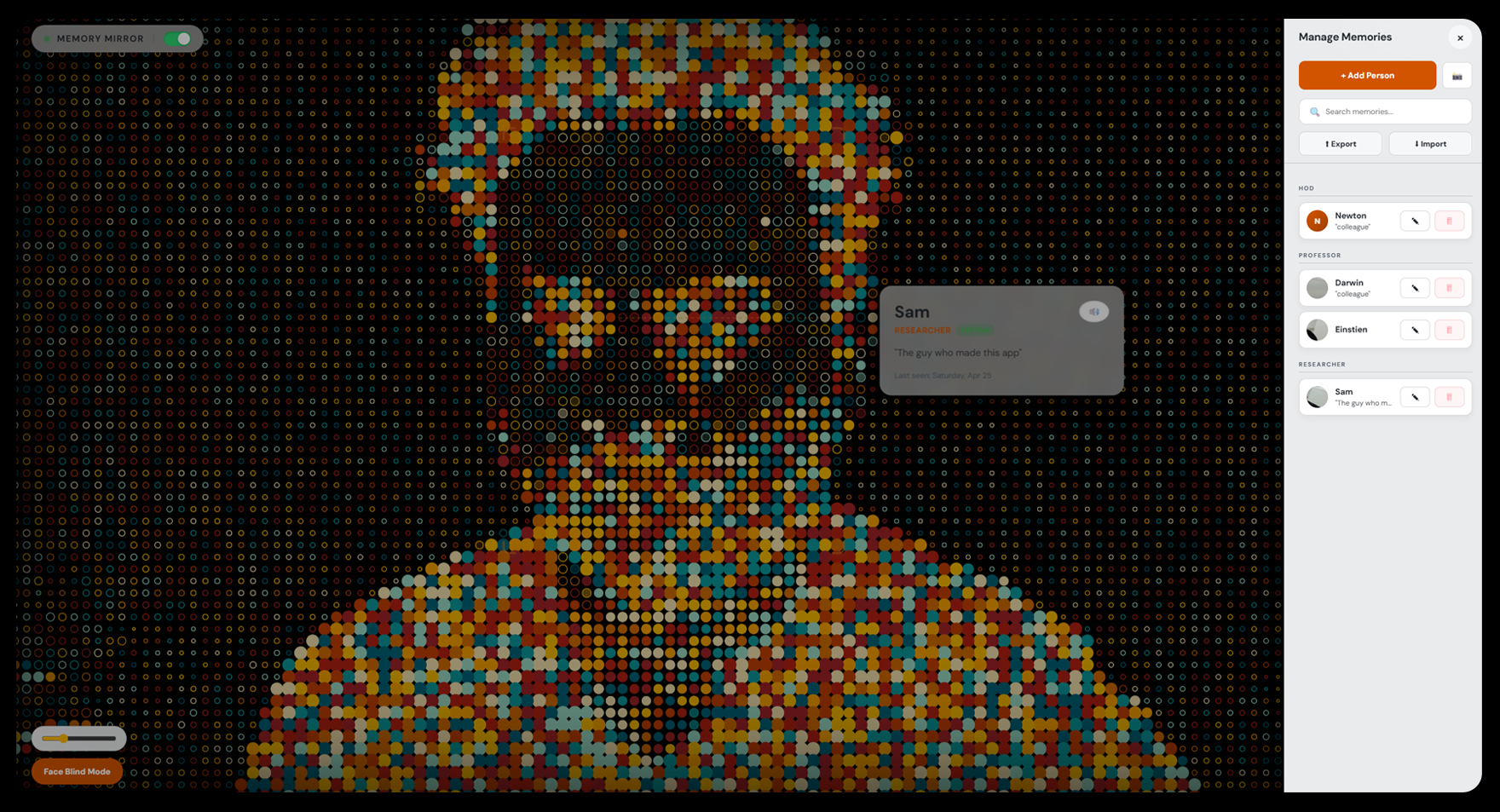
- Accessibility: Each memory card includes a speaker button that reads the note aloud via the Web Speech API, useful when glancing at a screen feels too obvious in a social setting. A Face Blind Mode toggle replaces the live camera feed with a painterly pointillist filter, so carers or family members setting up the app do not see identifiable faces while configuring profiles.
- Assistance: AI coding assistants (Anthropic's Claude) were used during implementation and refinement.
Design
The interface is built around one principle: when you need it, it should already be there.
The camera view fills the entire screen with nothing in the way. Controls live in a frosted pill in the top corners and recede visually into the background when not in use. Memory cards are positioned dynamically beside each detected face in the camera feed, connected by a faint dashed line, and sized to keep the name large and the note legible at a glance from across a desk. The colour system is warm orange on near-black, with high contrast and low aggression, plus a full light mode for bright rooms behind a single tap. The side panel slides in from the right, forms adapt their language to context ("Enroll via Photo" when adding, "Update Photo" when editing), and toasts shift left automatically when the panel is open so they never cover it. Every radius, hover state, and accent glow follows a consistent scale so primary actions remain unmistakable without shouting.
Reflection
As a self-directed prototype, Memory Mirror demonstrated that meaningful real-time face recognition for accessibility can run entirely on-device in a standard browser, without specialized hardware, cloud infrastructure, or a user account. The project takes a deliberately privacy-first stance in a category of assistive tool otherwise dominated by cloud-based, data-hungry alternatives, and shows that the trade-off in capability is smaller than commonly assumed.
The browser format does introduce one inherent constraint worth naming: the user must glance at a screen rather than directly at the person in front of them, which interrupts natural social flow. The logical next step is migration to a wearable display such as smart glasses or an AR headset, where recognition cards could appear in peripheral vision without breaking eye contact. The browser prototype deliberately prioritises zero-install accessibility as a starting point, with wearable integration as the intended direction.
The work prioritised technical feasibility, privacy architecture, and interaction design over controlled clinical validation. Rigorous user studies with prosopagnosia communities and memory-care contexts remain active directions for future development.
What Worked
- The full pipeline (detection, descriptor matching, card placement, and recognition memory) runs at interactive frame rates in-browser on consumer laptops without GPU acceleration.
- The 5-sample live enrollment flow significantly improved recognition stability across lighting and angle changes compared to single-photo enrollment.
- Batch ingestion with automatic clustering reduced the friction of setting up a database for someone with many people to remember (extended family, care teams, regular visitors), turning what could be a one-by-one chore into a guided queue.
- The privacy-by-architecture design, with no server, no account, and no upload, removed an entire category of objections that typically surround assistive face-recognition tools, particularly in care and clinical contexts.
- Export and import as a single file gave users a credible answer to the question of device replacement and continuity without introducing any cloud dependency.
- The decision to make the camera view the entire interface, with controls receding into corners, kept attention on the social moment rather than the tool. Closer to a hearing aid than an app.
- Face Blind Mode emerged from a specific concern raised in early conversation, that family members helping with setup should not feel watched, and turned out to be valued more broadly as a calmer default for ambient use.
What Did Not Work / Limitations
- No controlled study has been conducted with people who have prosopagnosia, early-stage dementia, or related conditions. Claims about real-world utility remain plausible rather than validated.
- The screen-based format requires the user to look away from the person in front of them to read the memory card, which is a fundamental constraint of the medium. A wearable display would resolve this and is the intended next platform.
- Recognition accuracy degrades in low light, with significant face occlusion (masks, large sunglasses), and at acute angles. These are limitations inherited from the underlying face-api.js models, which were not trained for assistive contexts specifically.
- localStorage is bound to a single browser on a single device. While export and import addresses portability, there is no automatic sync, no multi-device account, and data loss is possible if a user clears their browser data without exporting first.
- The system identifies faces but does not yet distinguish between similar-looking people the user has not enrolled, nor handle identical twins or close family resemblance gracefully.
- Memory notes are static text. They do not currently update from context (last-met dates only refresh on manual edit) and there is no support for richer media like voice notes or photo galleries per person.
- Mobile browser support is functional but not optimised. The camera framing, card placement, and panel layout were designed first for laptop and desktop use.
- Planned improvements, including on-device model upgrades, optional encrypted sync, integration with calendar and contact data, voice-driven note capture, and accessibility audits with assistive-tech users, remain outside the current prototype's scope.
Summary
Memory Mirror reframes face recognition not as a surveillance technology but as an ambient cognitive aid: quiet, local, and fully under the user's control. A laptop or tablet kept nearby acts as a silent reference screen, surfacing a person's name and context the moment they appear on camera, without any searching or tapping required. By keeping the entire pipeline in the browser and the entire database on the device, it demonstrates that one of the most privacy-sensitive categories of assistive tool can be built without ever asking the user to give up their data. The work establishes a working baseline for browser-based recognition prosthetics and points toward a research agenda focused on wearable integration, clinical validation, richer memory representations, and deeper collaboration with the prosopagnosia and memory-care communities the tool is built for.